Skip to content

Esta página también está en español.

Ver en español

Esta página também está em português.

Ver em português

Cette page existe aussi en français.

Questa pagina è disponibile anche in italiano.

Diese Seite gibt es auch auf Deutsch.

Deze pagina is ook in het Nederlands beschikbaar.

Ta strona jest też dostępna po polsku.

Zobacz po polsku

Bu sayfa Türkçe olarak da mevcut.

Türkçe görüntüle

Den här sidan finns även på svenska.

Trip countdown

Enter the departure and get a live countdown in the departure city’s local time, with a link you can send to your clients or travel companions.

The trip

The trip

You’re looking at an example. Change anything to make it yours.

Countdown

Pick the departure city and date to start the countdown.

The link carries the trip name, date and city. Nothing is stored on our servers.

How the countdown works

In the departure city’s time

The countdown ends at the local departure time in the city you pick, wherever the person opening it is.

A link to share

Copy the link and send it by email or message. Whoever opens it sees the same countdown, live.

Private by design

The countdown runs in your browser. The link carries the trip’s details (name, date, time and city), so whoever opens it sees the same countdown.

A worked example: one departure, two cities

A group leaves New York JFK at 18:45 on Saturday 3 July 2027, and one of the travelers lives in London. The countdown ends at 18:45 New York time, which is 22:45 UTC and 23:45 in London. Whoever opens the link, wherever they are, sees it reach zero at the same moment.

Opened at 09:00 on Tuesday 1 June 2027 in New York, it shows 32 days, 9 hours and 45 minutes. The traveler in London, opening it at that same moment (14:00 their time), sees exactly the same, because the countdown runs to one moment in time, not to a time on the viewer’s clock.
How the countdown keeps time

The departure is stored with the IANA time zone of the city you pick: America/New_York for New York, for example. The countdown turns the local departure time into universal time with that zone’s rules, from the IANA Time Zone Database in your browser, and counts down against your device’s clock. Daylight-saving changes between today and the trip are already taken into account.

The share link carries five things: the trip’s name, the date, the time, the time zone and the city’s name. The person who opens it needs no account and sees the same countdown. If a device’s clock is wrong, the countdown on that device is off by the same amount.

Sources

  1. IANA: Time Zone Database (accessed 15 October 2026)
  2. NIST: Daylight Saving Time (DST) (accessed 15 October 2026)
  3. GeoNames geographical database (accessed 15 October 2026)

For travel agencies

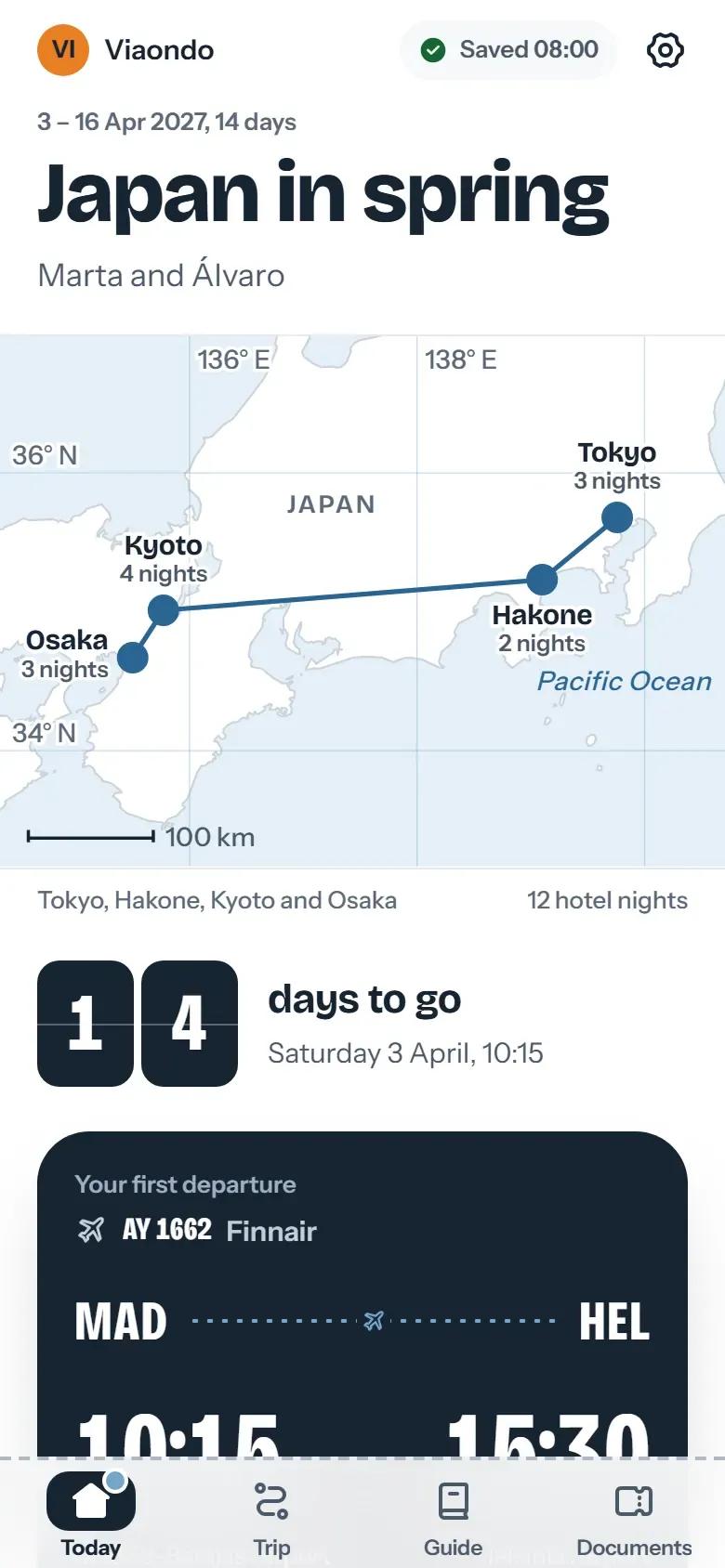
A countdown gives clients a reason to open what you sent them before the trip. In Viaondo’s traveler app the countdown sits at the top of the trip before departure, next to the Getting ready list, the flights and the documents, so each time the client checks the days they also see what’s still to do.

Or try Viaondo free for 14 days

Add it to your site

Add a live countdown to your website for a group departure or a trip you’re promoting. The widget shows only the countdown, in the departure city’s time; copy the code into your page, with no cookies or tracking.

Questions about the trip countdown

Does it take time zones into account?
Yes. The countdown ends at the departure time in the departure city, so it’s right even if you open it in another country.
Can I share the countdown?
Yes. “Copy link” gives you a link with the trip’s name, date and city. Anyone who opens it sees the same countdown.
Does it keep counting if I close the page?
The page recalculates the countdown from the departure date each time you open it, so it stays up to date. Save the link to come back to it.
Can my clients see the countdown in their trip app?
Yes. In Viaondo’s traveler app, the trip counts down the days to departure and shows what’s ready, next to the flights, hotels and documents.

Send your clients the whole trip

With Viaondo, your clients get flights, hotels, documents and a day-by-day plan in one app that works offline.

Traveler app before departure, with 14 days to go, the route and the Getting ready list
Your client’s trip app counts down to departure and shows what’s ready before they fly.

Add it to your site

Preview

Size

No cookies or tracking inside the widget. What it shows travels in the code; nothing is stored on our servers.

If it helps your readers, a link to the tool in your article is the best way to thank us.