Skip to content

Esta página también está en español.

Ver en español

Esta página também está em português.

Ver em português

Cette page existe aussi en français.

Questa pagina è disponibile anche in italiano.

Diese Seite gibt es auch auf Deutsch.

Deze pagina is ook in het Nederlands beschikbaar.

Ta strona jest też dostępna po polsku.

Zobacz po polsku

Bu sayfa Türkçe olarak da mevcut.

Türkçe görüntüle

Den här sidan finns även på svenska.

Independent travel advisors

A branded trip app for each client, with your name on it.

You plan each trip yourself, but the documents your clients receive look like everyone else’s. Viaondo turns your confirmations into a trip app with your name on it.

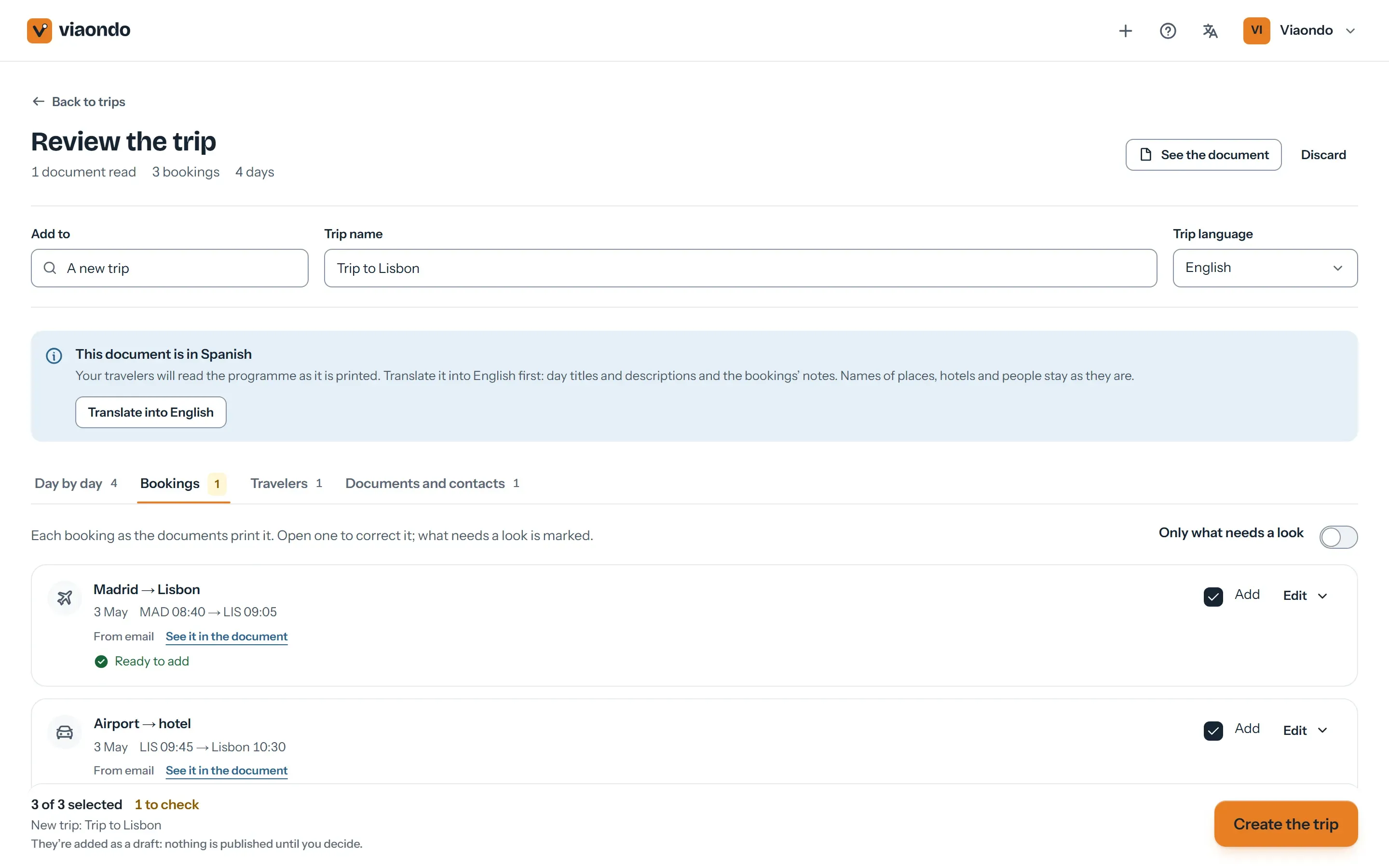
Import in the Viaondo dashboard with the bookings read from a confirmation PDF

What takes an independent advisor’s time

  • Retyping flight and hotel confirmations into a document that looks professional.
  • Clients who ask the same questions mid-trip because the PDF is buried in their inbox.
  • Tools priced per user or built for large agencies, with features you’ll never use.
  • Your brand disappears the moment the client downloads a supplier’s app.

What Viaondo does for an advisor working on their own

What one advisor needs to hand over a trip that looks like their own work.

  • Import instead of retyping

    Upload a PDF, a screenshot or a confirmation email: the flights, hotels, trains, transfers and activities go into your draft, each linked to the document it came from. Up to 300 documents a month are included.

  • Your name on every trip

    Your logo, color and contact details, a WhatsApp button to reach you and your review link after the trip.

  • A trip app on their phone

    Your client opens a link and sees what’s next: the flight with its gate and seats, the transfer, the day’s plans. It works offline.

  • Reuse your best trips

    Duplicate a past trip for a new client and its dates shift to the new departure, with your places and recommendations already in.

  • One flat price

    US$50/month for the agency, plus VAT where it applies, with unlimited trips and travelers. If you take on an assistant, they’re included.

A trip in Viaondo, start to finish

  1. Upload the confirmations

    Start with the ones you already have. Each booking goes into the draft with its local time and the document it came from.

  2. Check the draft

    Settle anything listed under To confirm, then add your recommendations: restaurants, tips, a note for the day.

  3. Run the Trip Check

    Make sure nothing is missing: documents, booking references, overlapping times.

  4. Publish and send the link

    Send it by WhatsApp, email or QR code. If something changes later, publish again and your client sees what changed.

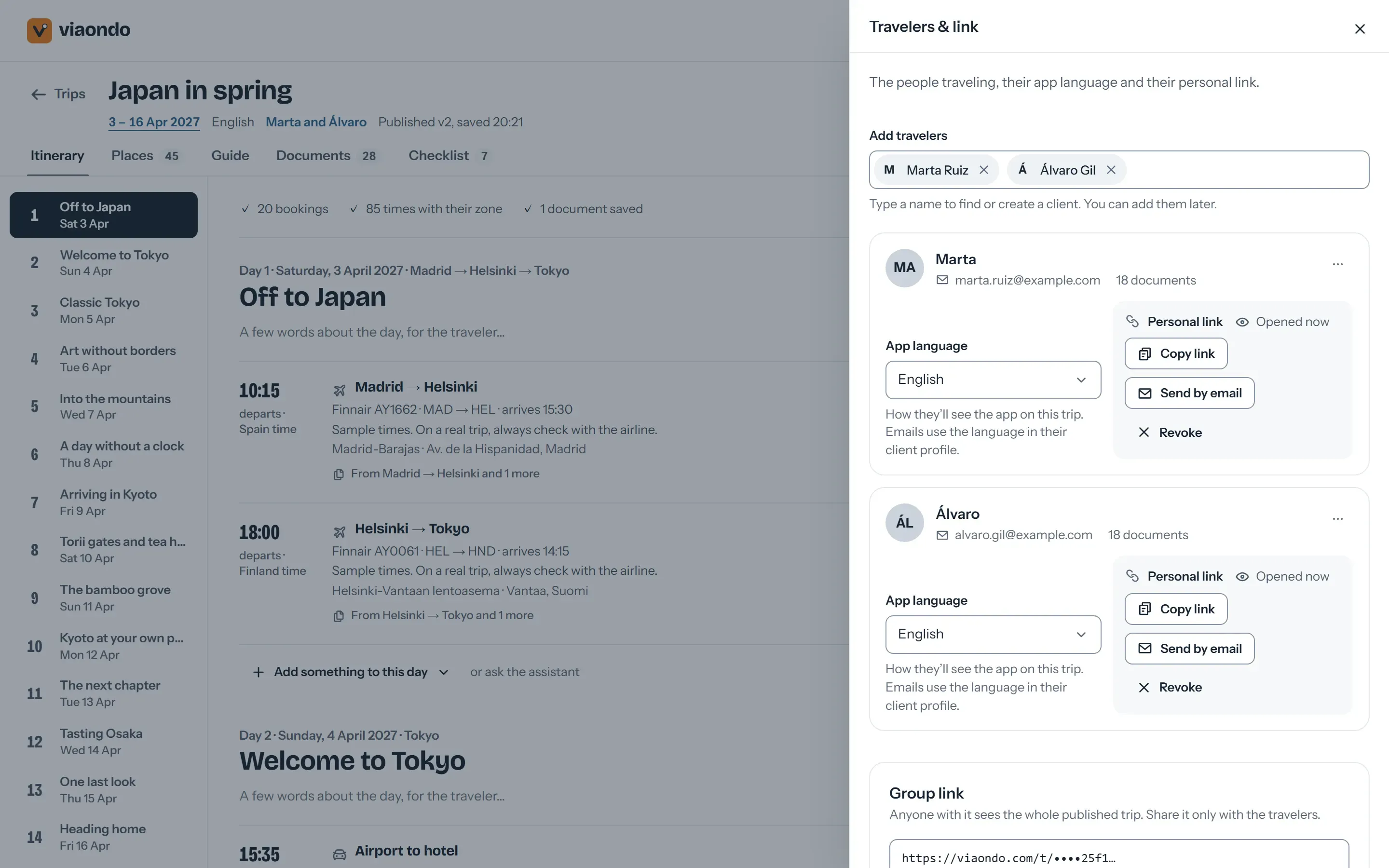
Share panel with the trip’s private group link and a personal link for each traveler
When the trip is ready, you send one private link by WhatsApp, email or QR code, or a personal link to each traveler.

Where Viaondo stops

What Viaondo does

  • Builds the trip from your confirmations
  • Puts your name on the trip app
  • Delivers it to your client’s phone

What Viaondo doesn’t do

  • Leads and proposals
  • Commissions and payments
  • Supplier bookings
  • An app in the app stores

If you want one tool for your whole business, a suite may suit you better.

What independent advisors use today

Advisors often run their business on an all-in-one suite. If that’s you, this is where Viaondo fits and where it doesn’t:

  • Travefy

    A suite with proposals, a CRM, a website builder and invoicing. If you want to run the whole business from one tool, it’s the better fit; Viaondo focuses on how your client receives the trip.

    Viaondo vs Travefy
  • TravelJoy

    A CRM, proposals, invoices and payments for advisors, with a free itineraries app for clients. Choose it for payments in the same tool; choose Viaondo for a branded app in ten languages.

    Viaondo vs TravelJoy
  • Tern

    An all-in-one platform with a CRM, payments, commissions and its own traveler app, priced per seat. Viaondo is one flat price per agency and only builds and delivers the trip.

    Viaondo vs Tern

A branded trip app for each client, with your name on it.

Using Viaondo alongside your host agency’s tools

Host agencies usually ask their advisors to book, report sales and collect commissions through the host’s own systems. Viaondo doesn’t replace any of that and doesn’t connect to it. It starts once a booking is confirmed:

  • Keep booking and reporting where your host requires. Viaondo only needs the confirmations, which you upload as PDFs, screenshots or emails.
  • Keep your host’s CRM and invoicing. Viaondo has neither, so nothing overlaps.
  • Check how your host wants its name shown. The trip app carries your logo, colors, contact details and WhatsApp button. If your agreement says how the host must appear on client documents, add it to your brand or the trip before you publish.
  • Pay Viaondo separately. It costs US$50/month, plus VAT where it applies, for your agency, apart from any host fees.

Frequently asked questions

Do I need a CRM or invoicing to use Viaondo?
No, and Viaondo doesn’t include them. It works next to the tools you already use to sell and invoice, and covers building the trip and delivering it to your client.
Do my clients have to install anything?
No. They open a private link in the browser and can add the trip to their home screen. There’s no App Store or Google Play app.
Can I try it before paying?
Yes. The first 14 days are free (nothing is charged until day 15), there’s no setup fee, and you can cancel anytime. You can also open the example app before creating an account.
Does it work with my host agency?
Viaondo doesn’t connect to host agency systems. You use it with your own brand, alongside whatever tools your host agency provides.
Is it safe to keep my clients’ passport copies in Viaondo?
If you work under the GDPR, your agency is the controller and Viaondo is the processor: a data processing agreement comes with the plan, files are stored privately, and passport copies and other trip documents are deleted 30 days after the trip ends. Before you upload passports to any tool, read what to ask an itinerary software vendor about client passports.

See your next trip as your client will

Start the 14-day free trial, import one real confirmation and open the trip on your phone. Or look at the example app first.