Skip to content Founding price: US$50€45£40 a month for as long as you stay Ends 31 December 2026 Start free →

Esta página también está en español.

Ver en español

Arrival-time calculator

Pick the origin and destination, the local departure time and the flight duration. We tell you what time and on which day you arrive, in the destination’s local time.

Flight details

Flight details

You’re looking at an example. Change anything to make it yours.

Flight duration

Arrival

Pick the origin and destination to see the arrival time.

Sending a client on this flight? Viaondo shows every flight in local time, with the trip’s documents, in one app with your agency’s brand.

See the example app

How it’s calculated

Each place’s local time

We convert the departure time to universal time with the origin’s time zone, add the duration and convert it to the destination’s time zone.

With clock changes

We use your browser’s time-zone database, which includes each country’s daylight-saving changes.

Your data stays in your browser

The calculation runs on your device. Only the list of airports and cities is downloaded.

A worked example: New York to London

A client leaves New York JFK at 19:30 on Thursday 13 May 2027, and the booking gives a flight time of 6 h 55 min. New York is on daylight saving time (UTC−4), so the departure is 23:30 UTC. Add the flight time and it’s 06:25 UTC on Friday. London is on British Summer Time (UTC+1), so the client lands at 07:25 on Friday 14 May, local time. The itinerary should show 07:25 with “+1”, because it’s the next day.

The same flight on Saturday 20 March 2027 lands at 06:25. The United States moves its clocks forward on 14 March 2027 and the UK only on 28 March, so for those two weeks London is four hours ahead of New York instead of five. The same happens from 31 October to 6 November 2027, when the UK has already gone back and the US hasn’t yet. Enter the real travel date and the calculator uses the offsets of that day.
Where the times come from

Time zones are set by governments, and their rules are collected in the IANA Time Zone Database, which phones, computers and booking systems use. The calculator relies on the copy built into your browser: it turns the local departure time into universal time with the origin’s zone, adds the flight time and turns the result into the destination’s local time.

Clock changes are part of those rules. In the EU the clocks change at 01:00 UTC on the last Sunday of March and of October; in the United States, at 02:00 local time on the second Sunday of March and the first Sunday of November. On the spring night one local hour doesn’t exist, and the calculator tells you if the departure falls in it; on the autumn night one hour happens twice, and it warns you to check with the airline which one applies.

The places come from open data: 1,171 large airports from OurAirports (public domain) and 560 cities of more than a million people from GeoNames (CC BY 4.0), each with its IANA zone. Countries do change their rules, so keep your browser up to date before you rely on a result for a place that changed recently.

Sources

  1. IANA: Time Zone Database (accessed 15 October 2026)
  2. Directive 2000/84/EC on summer-time arrangements, Articles 2 and 3 (Official Journal L 31, 2 February 2001) (accessed 15 October 2026)
  3. NIST: Daylight Saving Time (DST) (accessed 15 October 2026)
  4. OurAirports: open data downloads (accessed 15 October 2026)
  5. GeoNames geographical database (accessed 15 October 2026)

Add it to your site

Readers planning a long-haul trip can work out their arrival time on your page. Add the calculator to a destination guide or a post about flights: copy the code, paste it in, and it runs on its own, with no cookies or tracking.

Questions about the calculator

Which duration should I enter?
The flight duration shown on the booking, from departure to arrival. With stopovers, add up the legs and the waits.
Link to this answer
Does it account for daylight saving time?
Yes. If the departure time doesn’t exist or happens twice at the origin because of a clock change, we tell you.
Link to this answer
Why can’t I find my airport?
The list includes large airports and cities with more than a million inhabitants. Try the nearest city, which shares the time zone.
Link to this answer
Can I put these times straight into my client’s itinerary?
In Viaondo’s itinerary builder, every flight and transfer keeps its own time zone, so the arrival is worked out the same way and your client sees it in local time on their phone.
Link to this answer

Pablo Bravo builds Viaondo in Spain and answers the support email himself. About Viaondo · What’s new in Viaondo

Correct local times in every itinerary

In Viaondo, every itinerary time is stored in its place’s time zone and your client sees it the same way on their phone.

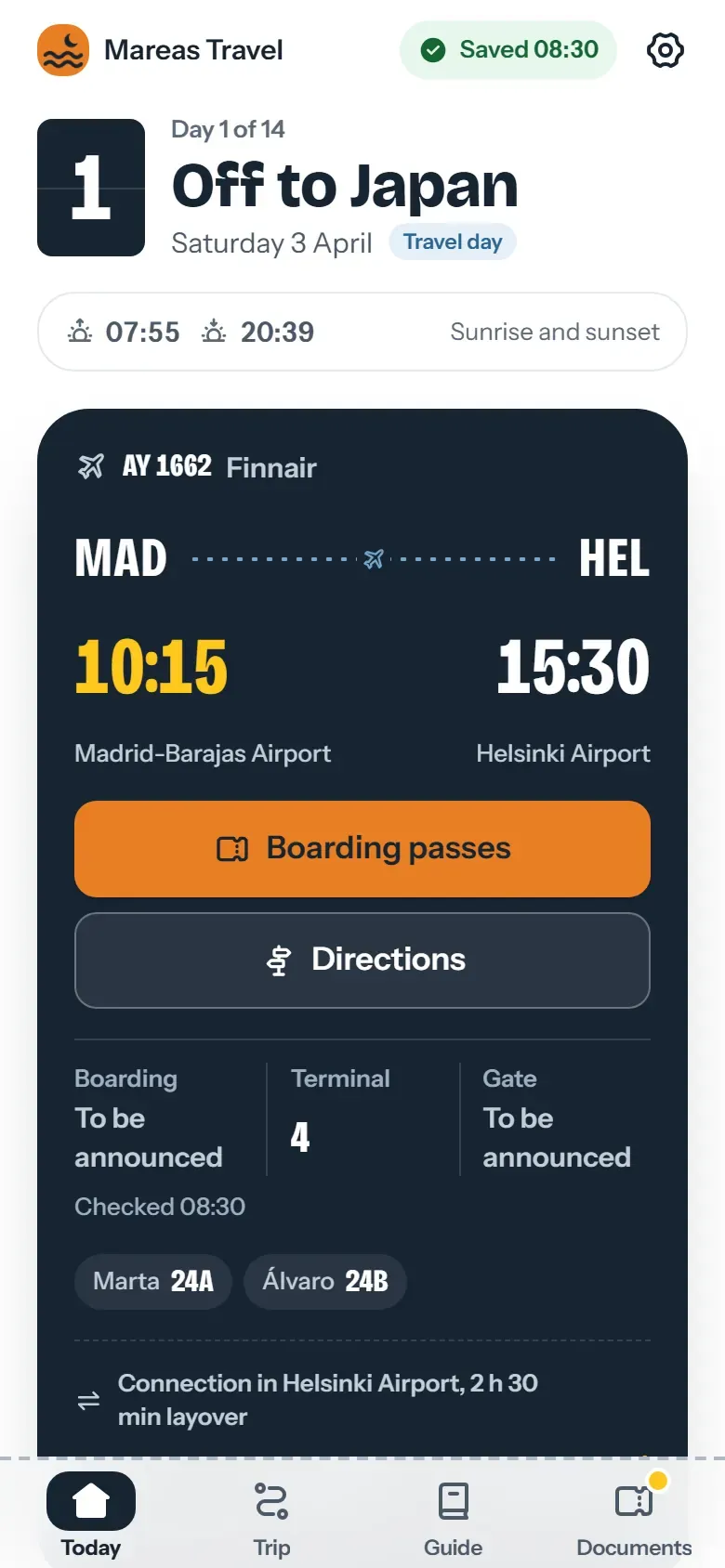
Flight card from Madrid to Helsinki with the departure and arrival in each airport’s local time
In the trip app, each flight shows its departure and arrival in its own airport’s time, with the zone’s name.

Add it to your site

Preview

Size

No cookies or tracking inside the widget. What it shows travels in the code; nothing is stored on our servers.

If it helps your readers, a link to the tool in your article is the best way to thank us.

Try it on a trip you’ve sold, no account

Describe a trip or drop up to 3 confirmations, and Viaondo emails you its app, usually in 5 to 15 minutes.

    or drop them on this box

    The app comes back with this name on it.

    We send the trip app’s link here once it’s ready. Nothing else.

    Text, PDF, email or a screenshot, up to 3 files.

    Usually 5 to 15 minutes

    Your files stay in the EU and are deleted with the example in 24 hours.