Skip to content Founding price: US$50€45£40 a month for as long as you stay Ends 31 December 2026 Start free →

Esta página también está en español.

Ver en español

From the booking PDF to the itinerary, without retyping.

Drop the confirmations as you received them, add a few words about the trip if you like, and Viaondo puts each booking in your draft with its local time and the document it came from. You check it, then you publish.

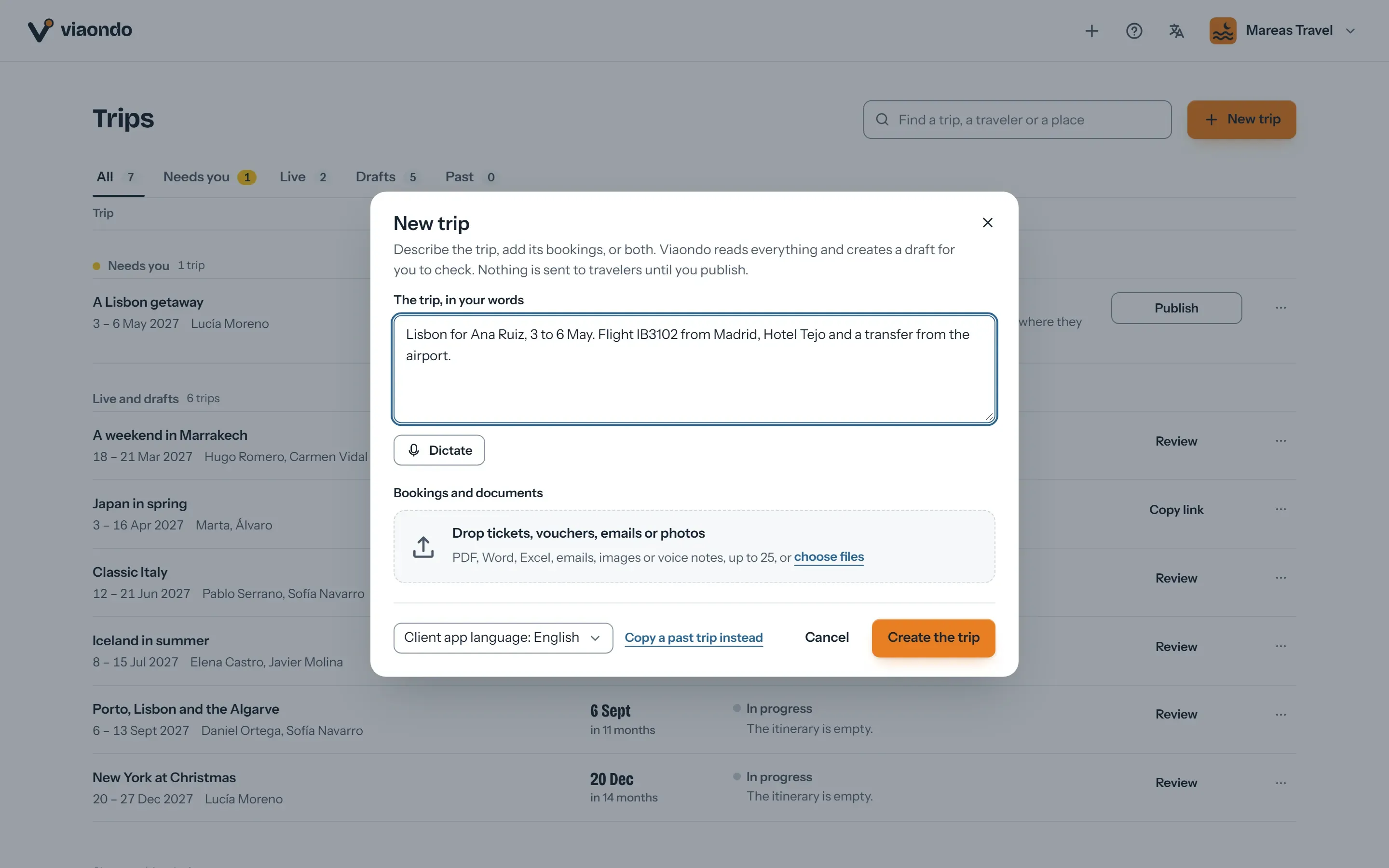
New trip dialog with a short description of a trip to Lisbon and a drop zone for bookings and documents
Describe it, drop the documents, or both
Day 8 of 14
  1. MAD
  2. Tokyo
  3. Hakone
  4. Kyoto
  5. Osaka
  6. MAD

Try it on a trip you’ve sold, no account

Describe a trip or drop up to 3 confirmations, and Viaondo emails you its app, usually in 5 to 15 minutes.

    or drop them on this box

    The app comes back with this name on it.

    We send the trip app’s link here once it’s ready. Nothing else.

    Text, PDF, email or a screenshot, up to 3 files.

    Usually 5 to 15 minutes

    Your files stay in the EU and are deleted with the example in 24 hours.

    What is Viaondo’s booking import?

    Viaondo’s booking import reads your confirmations, whether PDFs, screenshots, Word files or emails, and puts each flight, hotel, transfer or activity into the trip’s draft with its local times. Each booking points to the document it came from, and anything Viaondo could not be sure of is listed under To confirm. Nothing reaches your client until you publish.

    What the import does, and what it doesn’t

    What it does

    • Reads flights, hotels, trains, transfers and activities, several per document
    • Puts each booking on its day, with its local times and its source
    • Checks places on their own web pages and adds a credited photo when it can match one
    • Lists under To confirm what the documents leave open

    What it doesn’t do

    • Publish anything: nothing reaches your client until you publish
    • Fill in what a document doesn’t say: a missing time stays to confirm
    • Connect to a GDS or to supplier accounts: it reads the documents you give it
    • Go past 300 documents a month within the plan: write to us if you need more
    Example

    Worked example: two emails, one trip to Japan

    On the home page, a short description and two fictional booking emails, one from the airline and one listing what is booked on the ground, became Marta and Álvaro’s 14 days in Japan. These are the figures Viaondo counted. The two things to confirm are the ones the emails leave open: the ryokan’s pickup time and a food walk booked “on request”. Open the example app to see the result.

    Documents read
    2
    Bookings found
    20
    Places checked on the web
    45
    Times with their time zone
    45
    Things for you to confirm
    2

    Copying confirmations by hand is slow and error-prone

    • Every trip means dozens of times, booking references and addresses to type in by hand.
    • A time or airport copied wrong turns into a problem on the day of travel.
    • Suppliers send PDFs, screenshots and emails, each in its own format.

    How the import works

    1. Drop or paste

      PDFs, Word documents, images and screenshots, saved emails (.eml) or the pasted text of a confirmation, up to 25 files at once. Add a few words about the trip if you like.

    2. Viaondo makes the draft

      It reads each booking, puts it on its day with its local times and checks places on their own web pages. Anything it could not be sure of goes under To confirm.

    3. Check and publish

      Each booking shows its source. Fix a field in place or ask the assistant beside the trip. Nothing reaches your client until you publish.

    Booking import

    What you can import

    Confirmations from airlines, hotels, trains, transfers and activities, in whatever format they arrive, with or without a description of the trip.

    • PDF, Word (.docx), PNG, JPG or WebP images, saved emails (.eml) and pasted email text
    • Up to 20 MB per file and 25 files at once
    • Several legs and bookings in a single document

    Every booking shows its source

    In the draft, each booking points to the document it came from, each place to the web page it was checked on, and your own edits are marked as yours. Anything Viaondo could not be sure of, such as a pickup time a voucher leaves open, is listed under To confirm.

    • Local times as the booking prints them, with the place’s time zone
    • The original document kept with the trip
    • Nothing is published until you publish

    Ask the assistant for the rest

    Beside the trip, tell the assistant what to change, for example “move the cooking class to Thursday”. It edits the draft at once, shows the difference and its source, and you choose Keep or Undo. Documents you drop there are read into the same trip.

    • “See as” opens the app exactly as your travelers will get it

    Monthly import limit

    The plan includes up to 300 imported documents per agency per month. If you need more, write to us.

    • The dashboard shows this month’s count
    • If a document can’t be read, we tell you and you can try again

    Privacy

    Viaondo sends the document to the AI provider only to extract the booking details. You’ll find it in the list of sub-processors and in the data processing agreement.

    • The file is kept in your agency’s private storage until 30 days after the trip ends
    • Recommendation: don’t upload sensitive data the trip doesn’t need

    Moving from another tool?

    What comes out of Travefy, TravelJoy and Vamoos, what you rebuild from your confirmations, and the steps, checked on each tool’s help center.

    Questions about the import

    Does the AI publish anything on its own?
    No. Nothing reaches your client until you publish. Imports go into your draft, each booking points to the document it came from, and anything Viaondo could not be sure of is listed under To confirm.
    Link to this answer
    What if it gets something wrong?
    Correct the field in place, or tell the assistant what to change. Each booking shows the document it came from, so you can check it against the source before you publish.
    Link to this answer
    Can I add documents to a trip I already made?
    Yes. Drop them on the assistant beside the trip and Viaondo reads them into the draft, with the same sources and To confirm notes.
    Link to this answer
    How long does it take?
    Usually 5 to 15 minutes for a whole trip. A row on the Trips page shows each stage while Viaondo works.
    Link to this answer
    How many documents can I import?
    Up to 300 per agency per month within the plan (US$50/month, plus VAT where it applies). Before you start your free trial, you can try it with 20 documents.
    Link to this answer
    Can I import a forwarded email?
    Yes: upload the saved email (.eml file) or paste its text into the import.
    Link to this answer
    Is my clients’ data sent to an AI?
    Only the documents you import, to read the bookings. Viaondo sends each one to NaN, an AI provider run by Helmcode S.L. in Spain, which reads it in the European Union, doesn’t store or log the document or the result and doesn’t use them to train models, as the sub-processors page says. The file stays in your agency’s private storage and is deleted 30 days after the trip ends. Our guide to client passports in itinerary software lists what to ask any vendor.
    Link to this answer
    How does this compare with other itinerary tools?
    The import is included in the plan, up to 300 documents a month. To compare it with other tools, read what ten itinerary tools charge and how the main ones compare beyond price.
    Link to this answer

    Who makes Viaondo, and how we check it

    Who builds it

    Pablo Bravo builds Viaondo in Spain and answers the support email himself.

    About Viaondo

    Where the data lives

    The database and files are stored in the European Union, under a data processing agreement. Tickets and vouchers are deleted 30 days after the trip ends.

    Data processing agreementSubprocessors

    How we check other tools

    Other tools’ prices and features come from their own pages, and every comparison shows the date we checked it. Latest check: 5 November 2026.

    Travel agency software prices, side by side

    How well the import reads

    We publish a benchmark of the booking import, with its method and results.

    We ran 57 fictional travel documents through our AI import: what it got right and what it missed

    What has shipped

    Every product update is dated and explained in plain language. Latest: 4 November 2026.

    What’s new in Viaondo

    Import your first booking today

    Sign up without a card and drop a real confirmation to see the draft Viaondo makes. Add a card when you start the 14-day free trial to publish.