Skip to content Founding price: US$50€45£40 a month for as long as you stay Ends 31 December 2026 Start free →

Esta página también está en español.

Ver en español

Viaondo vs Travefy

Travefy is a suite for travel advisors that brings together proposals, a CRM, a website builder and invoicing, plus an app for your clients. Viaondo focuses on the trip itself: you build it and send it to your client as an app with your brand, in ten languages. Pricing is flat per agency. If you want to run your whole business from one tool, Travefy is the better fit. Viaondo fits better if you already sell your own way and care most about how your client receives the trip.

Try it on a trip you’ve sold, no account

Describe a trip or drop up to 3 confirmations, and Viaondo emails you its app, usually in 5 to 15 minutes.

    or drop them on this box

    The app comes back with this name on it.

    We send the trip app’s link here once it’s ready. Nothing else.

    Text, PDF, email or a screenshot, up to 3 files.

    Usually 5 to 15 minutes

    Your files stay in the EU and are deleted with the example in 24 hours.

    How do Viaondo and Travefy compare, point by point?

    Checked November 2026

    Key to the marks
    Included
    Partial
    Not included
    Not stated
    Viaondo Travefy
    Price US$50/month, plus VAT where it applies Core: $39/month billed annually or $49 billed monthly; Premium: $59/month billed annually
    Pricing model Per agency, team included Per user: each extra user adds $20/month on annual Core ($35 on monthly Core) or $39/month on annual Premium
    Traveler app with your brand Included: Yes, included Partial: Trip Plans shows your logo and no Travefy branding, per Travefy; an app under your own name is quoted on request
    Works offline Included: Yes, except the street map Included: Yes: clients can download their trip in the app
    App languages Included: Ten languages Partial: English and Spanish, per the Trip Plans App Store listing
    AI booking import Included: Yes: PDFs, images and emails Included: Yes: “AI Content Import”, included from Core
    Data hosted in the EU Included: Yes (database and files) Not stated: Not stated
    Setup fee Included: No setup fee Not stated: Not stated
    Free trial 14 days, card needed to publish 10 days, no credit card
    App Store and Google Play app Not included: No (web app) Included: Yes: Trip Plans, free for iOS and Android, with in-app chat; clients sign up for a free account
    CRM, proposals and invoicing Not included: Not included Included: Included from Core, with commission tracking
    Custom domain Not included: No Partial: Included on Premium

    Facts checked on . Prices and features may change. Reviewed by Pablo Bravo.  Prices and features come from each vendor’s own pages; no vendor input.

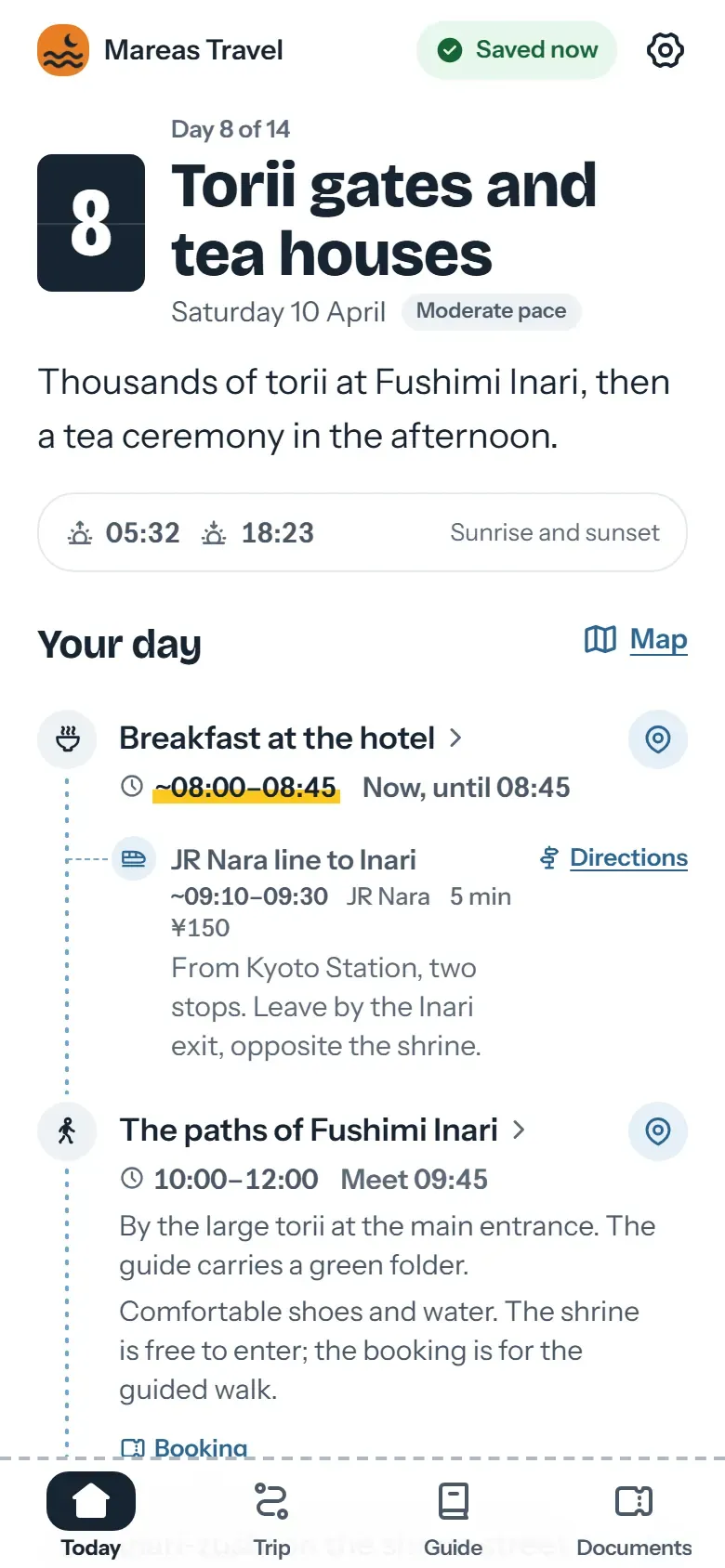
    Today screen of the traveler app in Kyoto: the agency’s name at the top, then the next plan with its meeting time and time zone
    What your client opens from the link: your agency’s name at the top, and every time in local time with its time zone.

    What would your team pay a year?

    Travefy’s listed price per user against Viaondo’s one price for the whole agency. Move the slider to your team’s size.

    3 people
    1. Viaondo One price for the agency US$500
    2. Travefy US$468 + 2 × US$240 US$948

    From 2 people, Viaondo costs less a year than Travefy.

    Prices billed yearly, as listed; VAT excluded where it applies.

    What does Travefy do better than Viaondo?

    Travefy runs more of the business around the trip. According to its pricing page, the Core plan includes an itinerary and proposal builder, a CRM with forms and automations, a website and landing page builder, invoicing with commission tracking, email integration and AI content import. From that list, Viaondo matches the itinerary builder and the AI import. It has no CRM, proposals or payments.

    Travefy also has the edge here:

    • An app in the stores. Your clients use Trip Plans, an iOS and Android app that sends them flight notifications. Viaondo is a web app and isn’t in the App Store or Google Play.
    • A branded app in the stores. Through its enterprise offering, Travefy provides a version of Trip Plans with your brand, your icon and your own App Store and Google Play listings. Pricing is on request.
    • Tools for agent networks. Its agency plan adds commission and revenue reporting, a shared template library, centralized supplier management, a dedicated account manager and access to the CRM API.
    • Entry price if you work alone. Billed annually, Core costs $39/month, and its program for people who are new to the industry costs $25/month.

    How is Travefy priced?

    Travefy charges per user. Billed annually, Core costs $39/month for the first user and adds $20/month for each extra one; Premium costs $59/month and adds $39/month per extra user, and includes a custom domain. The trial lasts 10 days, and the pages we checked don’t mention a setup fee.

    For one advisor, Core billed annually costs less than Viaondo’s US$50/month. From the third user the order flips: three people pay $79/month on Core and $137/month on Premium, while Viaondo stays at US$50/month for the whole agency, plus VAT where it applies.

    When is Viaondo the better choice?

    Viaondo is the better choice when the trip app matters more than the back office around it. These are the cases where Travefy’s own pages point the other way:

    • You want every trip to carry your brand from day one. Trip Plans shows your logo under its own store name, and an app of your own is quoted on request. In Viaondo you set your logo, color, contact details, WhatsApp button and review link once, with no enterprise plan. See branding.
    • Your clients speak other languages. The Trip Plans App Store listing shows English and Spanish. Viaondo’s app and dashboard work in ten languages, including Portuguese, French, Italian and German.
    • You work as a team. One price covers the agency instead of one per user. Details on pricing.
    • You care where your data lives. Travefy’s pricing page doesn’t say where data is stored; Viaondo’s database and files are in the EU.

    Who should stay on Travefy?

    Stay on Travefy if most of your working day already happens inside it. A solo advisor who captures leads with its forms, sends a proposal, turns it into an itinerary and invoices the same client without switching tools gets the most out of Core. An agency on the agency plan that reports commission and revenue across advisors, shares one template library and manages suppliers in one place would lose that overview by moving. The same goes if your clients already use Trip Plans and count on its flight notifications.

    Some agencies keep Travefy for selling and use Viaondo only to deliver the trip. Do the sums first: Viaondo would add US$50/month on top of the Travefy bill, plus VAT where it applies. A mixed setup is worth it only if a branded app, more app languages or EU hosting matter more to your clients than that difference.

    How does your client open the trip?

    According to Travefy, when clients tap the link they’re prompted to view the trip in the Trip Plans app, which opens the App Store or Google Play. With Viaondo, the link opens the traveler app straight in the browser. You can send one group link with the whole trip, or personal links that give each traveler their own documents and seats.

    Moving from Travefy?

    Travefy lets you take out your contacts and a PDF of each trip, but not the itineraries as data, so trips are rebuilt in Viaondo from the supplier confirmations they were made from. This is what Travefy’s help center says, page by page.

    What you can take out of Travefy

    • Your contacts as a CSV file: Account › Data › Export Contacts (on a team, only the admin can export)
    • Each trip as a PDF, from the trip’s PDF button
    • Your trips, library items, contacts and website for 45 days after you cancel; after that they may be deleted

    What you rebuild in Viaondo

    • The itineraries: no itinerary data export is documented, and trips move only from one Travefy account to another
    • Each upcoming trip, from its supplier confirmations, with booking import

    Not confirmed by Travefy

    • Whether clients can still open their trips in Trip Plans after you cancel
    • How to delete your account and its data

    How to move

    1. Before you cancel, export your contacts and save a PDF of every trip you still need: the 45 days run from the day you cancel.
    2. Start with your next departures: upload their PDFs, screenshots or confirmation emails to booking import, check what’s listed under To confirm, and publish.
    3. Let trips already in Trip Plans finish there, so no client changes apps mid-trip. New trips arrive as a link, with nothing to download.

    Try it with one of your own trips: upload its confirmations. You can import up to 20 documents before you start the free trial.

    Import a trip’s confirmations

    Moving from TravelJoy? Moving from Vamoos?

    Sources

    1. Travefy: Pricing (accessed 5 November 2026)
    2. Travefy Help: team pricing on annual and monthly billing (accessed 5 November 2026)
    3. Travefy: Trip Plans app (accessed 5 November 2026)
    4. Travefy: software for agencies and teams (app shows the advisor’s logo) (accessed 5 November 2026)
    5. Travefy: custom-branded apps for enterprise (accessed 5 November 2026)
    6. Trip Plans on the App Store (accessed 5 November 2026)

    Frequently asked questions

    Does Viaondo have a CRM, proposals or invoicing like Travefy?
    No. Viaondo covers building the trip and delivering it as an app. If you need a CRM, proposals and invoicing in the same tool, Travefy includes them from its Core plan.
    Link to this answer
    Do my clients have to download an app?
    With Viaondo, no: they open the trip from a private link and can add it to their home screen if they like. According to Travefy, its link prompts the client to view the trip in the Trip Plans app, which is downloaded from the App Store or Google Play.
    Link to this answer
    What would a team of three pay?
    With Viaondo, US$50/month per agency, plus VAT where it applies, team included (fair use). On Travefy Core billed annually, $39/month for the first user and $20/month for each additional one: $79/month for three. On Premium, $59/month plus $39/month per additional user: $137/month.
    Link to this answer
    Can I bring my Travefy itineraries into Viaondo?
    Not as data: Travefy’s help center documents no itinerary data export, and Viaondo doesn’t connect to Travefy. You rebuild each upcoming trip from its supplier confirmations with booking import, which puts every booking into the draft with its local time and the document it came from. Save a PDF of each Travefy trip for your records.
    Link to this answer
    What happens to my Travefy data after I cancel?
    According to Travefy’s help center, your trips, library items, contacts, website and data are guaranteed for 45 days after you cancel and may be permanently deleted after that. Export your contacts as a CSV file and save the trip PDFs you need before you cancel.
    Link to this answer
    Can I take my data out of Viaondo if I leave?
    Yes. The agency’s owner downloads everything the agency holds in Viaondo as one ZIP file from Agency settings: its settings, team, trips with their versions and links, travelers, imports, activity and files. It works whenever you want, with or without an active plan.
    Link to this answer

    See it with your own trips

    14 days free, no lock-in. Import a real trip and see how your client receives it.